Query a semantic view with Cortex Analyst
Cortex Analyst is Snowflake’s natural-language query surface for semantic views. Once the Data Product Studio has deployed a semantic view, you point Cortex Analyst at it and ask questions in plain language instead of writing SQL. This article covers where the platform’s work ends and Cortex Analyst takes over. It does not re-document Cortex Analyst itself; Snowflake’s own documentation covers that surface in full.
How the query works
- Cortex Analyst reads the semantic view: its metrics, dimensions, and any synonyms, verified queries, and custom instructions attached to it.
- You ask a question in natural language, for example “What was total work order cost by site last quarter?”.
- Cortex Analyst answers using the governed metrics in the semantic view, so the answer respects the same definitions and lineage the data product was built on.
The platform’s part ends at the semantic view. It generates the semantic view from your governed metrics, carrying the metric definitions, process context, and lineage of the data product, and publishes it as an object in Snowflake. You do not query it from inside the platform: once it is published, you query the semantic view through Cortex Analyst in Snowflake, the same as any other semantic view in your account.
Access you need
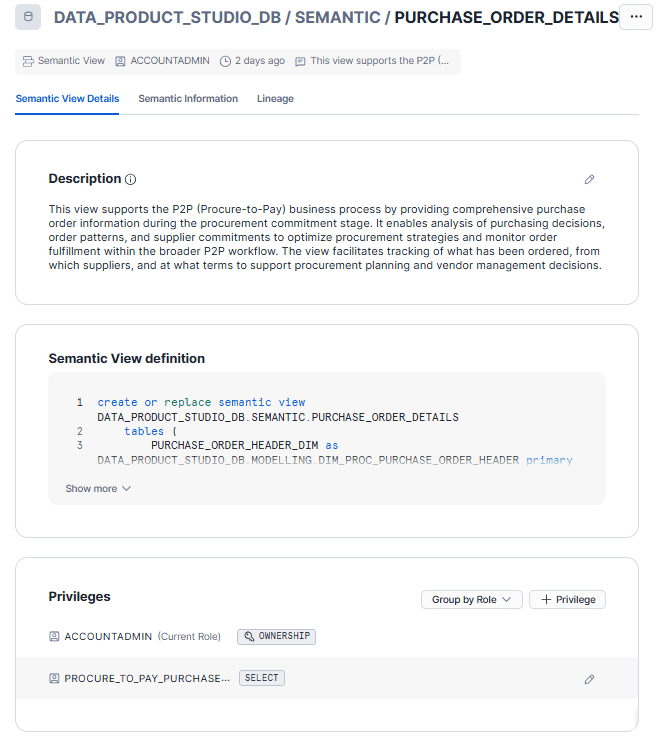
Querying the semantic view is governed by a Snowflake role, and the platform creates that role as part of the data product, so you do not set it up by hand. To see it, open the Semantic View object in Snowflake and look at the Privileges section, which lists each role and its privilege. The access role created with the data product holds the SELECT privilege on the view; the owner role holds OWNERSHIP. You need that access role, or another role it has been granted to, to query the view through Cortex Analyst.
Note: Cortex Analyst is a Snowflake feature. Cortex must be available and granted in your account. See Set up roles for the studio for how Cortex access is granted to the platform.
See also
- Prerequisite: Overview: semantic views in the studio
- Reference: Cortex Analyst in the Glossary