Review and edit generated entities
After the platform generates entities, you decide which to keep, how to type them, and which data product they belong to. This article covers the review surface and the Edit Entity dialog.
Applies to: Domain expert
The entity list
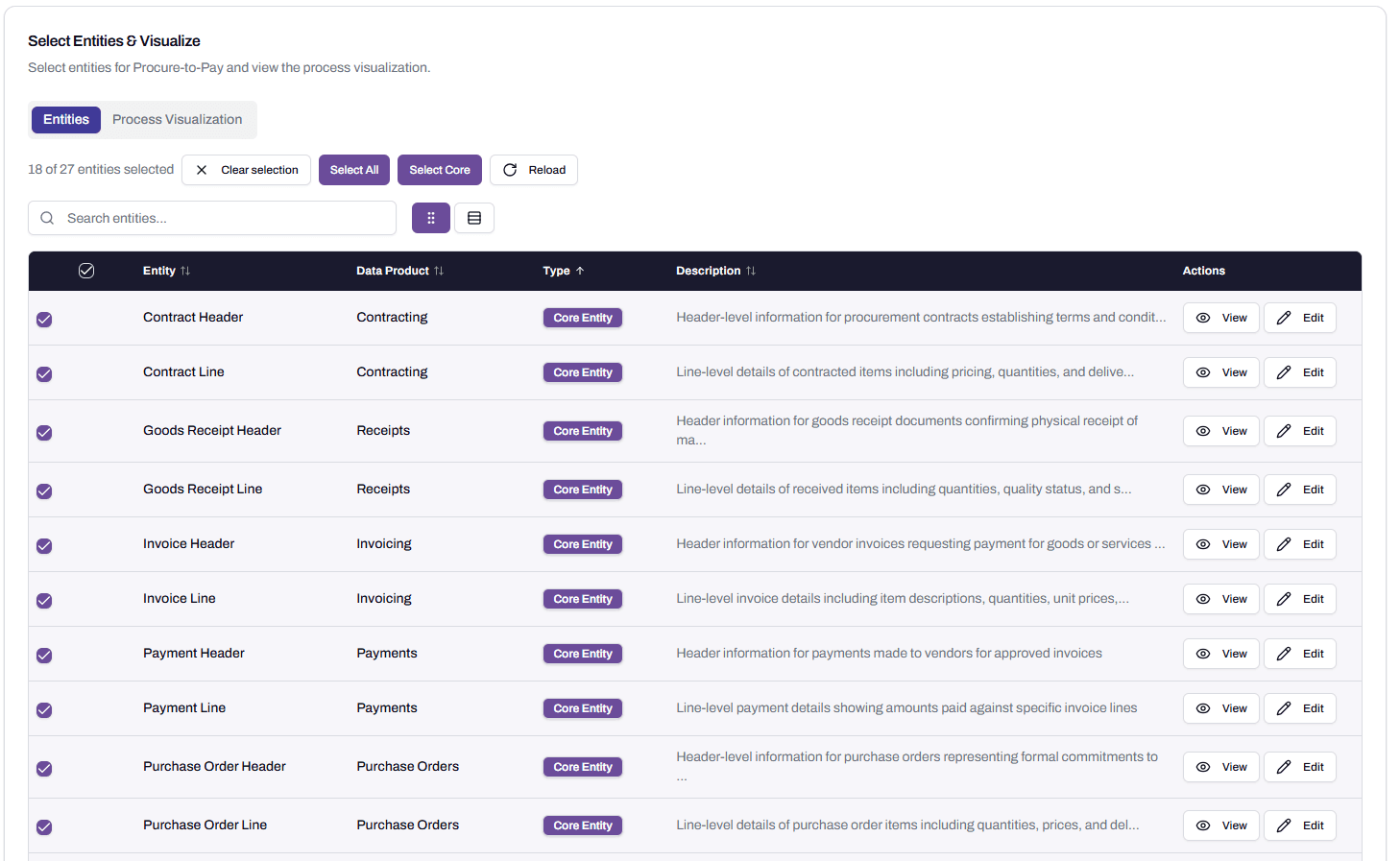
The list shows every entity the platform proposed, with columns for Entity name, Data product, Type, and Description. Three controls sit above the list.
Select All picks every entity. This is the recommended starting point. You can always remove entities later, and missing one at this stage means re-running generation.
Select Core picks only the transactional entities. Useful when you want a minimal starting point, but most readers should start with Select All.
Clear selection removes all selections.
The View button on each row opens a read-only catalog detail showing description, process role, and a typical field list with data types. Use it to confirm whether an entity belongs in your selection.
Core and Supporting
Every entity is tagged Core or Supporting.
A Core Entity is a transactional object central to the process. Purchase Order Header, Invoice Line, Goods Receipt, and Payment Header are core for Procure-to-Pay. They’re the things the process produces and consumes.
A Supporting Entity is reference or master data that the core entities depend on. Vendor, Cost Center, Material, Plant, and Employee are supporting for Procure-to-Pay. They give context to the transactional records but aren’t transactions themselves.
The distinction matters for two reasons. First, supporting entities default to a single Master Data data product, because they’re reference data shared across many processes. Core entities split into process-specific data products. Second, supporting entities tend to need different governance than core entities, because reference data is often more sensitive (Employee is PII; a Goods Receipt usually isn’t).
You can change an entity’s type. See the next section.
The Edit Entity dialog
Click Edit on any entity to open the Edit Entity dialog. Six fields are editable.
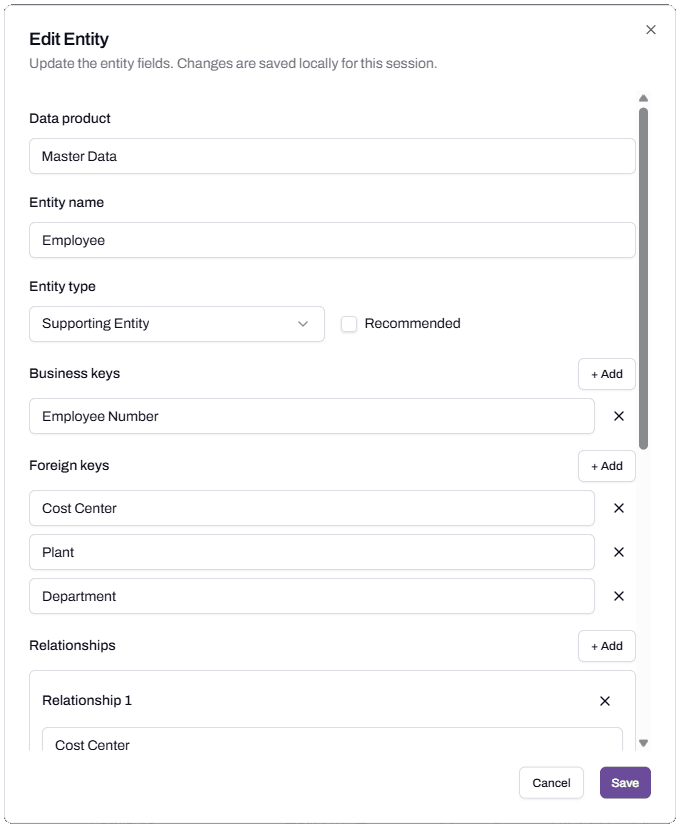
Data product. Which data product the entity belongs to. By default, supporting entities all land in Master Data and core entities split by sub-process. Change this when an entity needs its own data product, usually for governance reasons.
Entity name. The business-language name. Rename it to match your team’s terminology if the platform’s default is wrong.
Entity type. Core Entity or Supporting Entity. Change the type when the platform has miscategorised, or when your team treats reference data as transactional within this process.
Recommended. A flag indicating the entity is part of the recommended starting set. The platform sets this; you can override.
Business keys. The fields that uniquely identify a record. The platform infers these from typical field patterns (Employee Number for Employee, Contract ID for Contract Header). Adjust if your source system uses different keys.
Foreign keys. The fields that link this entity to others. Foreign keys feed the relationships shown in the process map.
Relationships. The links between this entity and others. The platform infers them; you can add or remove.
When to edit before saving
Edit before saving when the change affects governance. The most common case is Master Data. By default, every supporting entity lands in Master Data, which means they all share governance settings in the next stage. That works for entities with similar governance needs, but Employee or Person inside Master Data brings in PII that the rest of the data product doesn’t carry.
If an entity has distinct governance needs, edit it before saving and move it to its own data product. Move Employee out of Master Data into a new data product called Employee, and that data product can carry its own Confidential and PII rating. The remaining Master Data data product keeps its lighter rating for the rest of the reference data.
The mechanic of this is documented in the Discovery Wizard walkthrough. The reasoning is here.
When to edit after saving
The wizard saves data products from the Data Products page. Editing entities after that point is supported but should be the exception, not the rule. Use it for late additions: an entity you didn’t realise you needed, a missing piece of master data, a relationship that wasn’t picked up.
If a saved data product needs significant rework, the cleaner path is usually to delete it and re-run generation with better context, rather than editing entity by entity.