What is the Data Product Studio
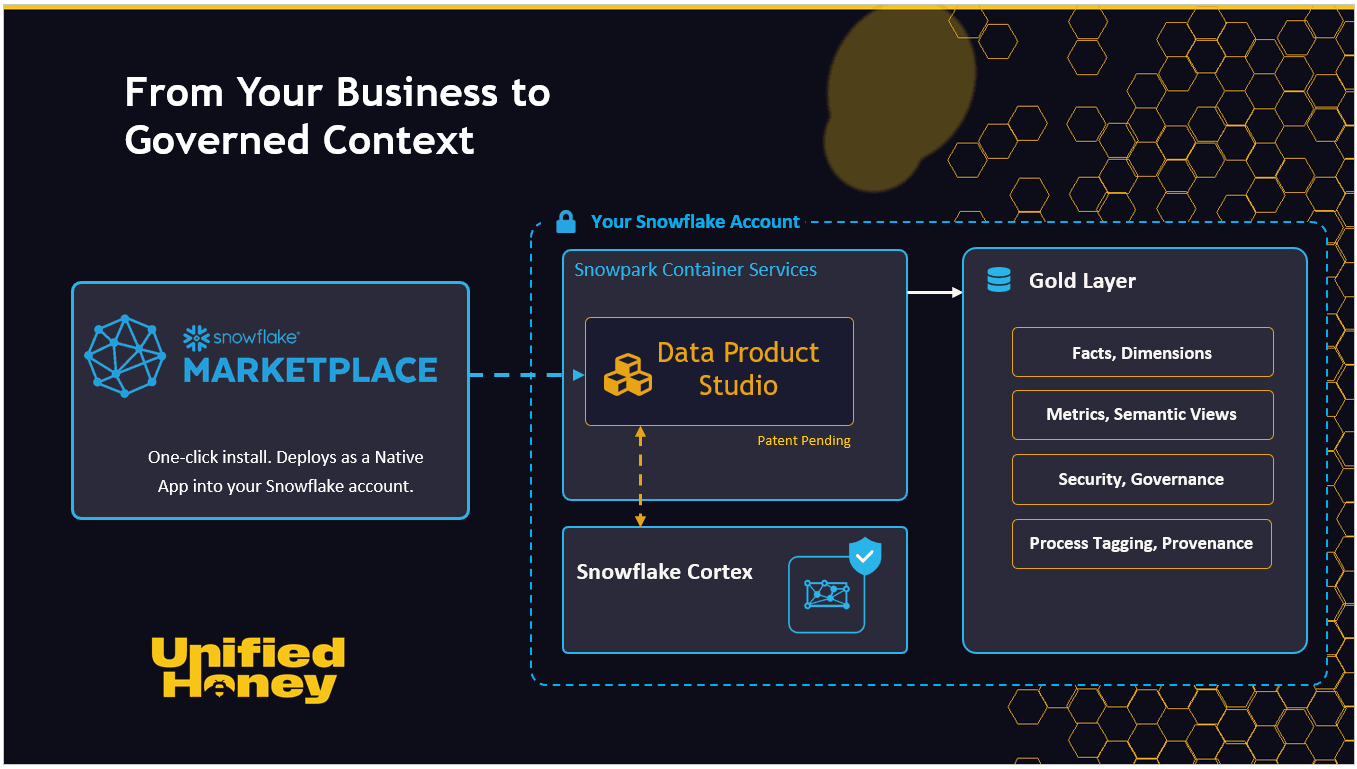
The Data Product Studio is a Snowflake Native App. It designs governed data products from your business domain and process knowledge, then connects source data into them. This article is what an evaluator needs to know before installing.
Applies to: someone evaluating the platform from the Marketplace listing
What it does
The platform starts with the business. Pick a domain (such as maintenance, procurement, or finance) and a process within it (such as “Work order to completion”). Add context about the use case, the source system, and the people who will use the data. The platform generates an entity model and a process map from that.
Governance is set at the business concept level. Access, validation, and lineage are attached to entities before any source data is connected. When source data does come in, the platform maps it into that pre-defined structure.
This is the inverse of starting with source tables and building business meaning later. You decide what your data means first, then attach the data. The result is a shared language for the business: what entities mean, how they relate, and what counts as a metric.
The four stages
The platform moves through four stages, in order. Each is a section of these docs.
- Define. Choose a domain and process, provide context, generate an entity model and process map.
- Design. Group entities into data products. Set governance at the business level. No source data yet.
- Connect. Open the visual designer. Profile source tables and map them to your business entities. Output: Facts and Dimensions.
- Generate. Generate metrics, build semantic views, apply process tagging, and deploy to Snowflake.
What you get
Each deployed data product produces four kinds of output, grouped together as the Gold Layer:
- Facts and Dimensions. The dimensional model, named in business terms rather than source-system column names.
- Metrics and Semantic Views. Generated metrics built from the Facts and Dimensions, packaged into a semantic view that’s queryable through Cortex Analyst and Cortex Agents.
- Security and Governance. Access controls, validation rules, and lineage, defined at the business concept level and applied to every output.
- Process Tagging and Provenance. Metadata that links every output back to the process it was generated from, so the trail from a business process to a deployed metric is traceable end to end, with full provenance. The platform calls this the golden thread.
What it isn’t
- Not a SQL editor. You don’t write SQL to build a data product.
- Not a BI tool. You won’t build dashboards inside it.
- Not a data catalogue. The platform produces governed data products; cataloguing them downstream is a separate concern.
It is a design and deployment surface for data products that sit on top of your existing Snowflake account.
Next step
The platform runs as a Snowflake Native App inside your own account, with no outbound network access. Unified Honey, the company behind it, is part of the Snowflake Startup Accelerator. The install runs from the Snowflake Marketplace listing .
See also
- Sibling: Install from Snowflake Marketplace
- Next step: Install from Snowflake Marketplace
Search keywords
what is data product studio; unified honey product overview; native app overview; snowflake native app data products; what does data product studio do; data product studio explained; evaluate data product studio