Use filters and delete conditions
Two SQL fields on the source table mapping decide which rows make it into the model and which are treated as deleted: Table filter and Delete Condition. This article covers when and how to use each.
Applies to: Domain expert, Data engineer Detail level: Standard
Who this is for
You’ve connected a source table that contains rows you don’t want in the model, or rows that should be treated as deleted. You’re comfortable with SQL WHERE clauses and Boolean expressions.
Before you start
You’ll need:
- A source table mapped to a model. See Map source fields to model fields.
- A clear sense of which rows you want to include or exclude, expressed as a SQL condition.
Where the fields live
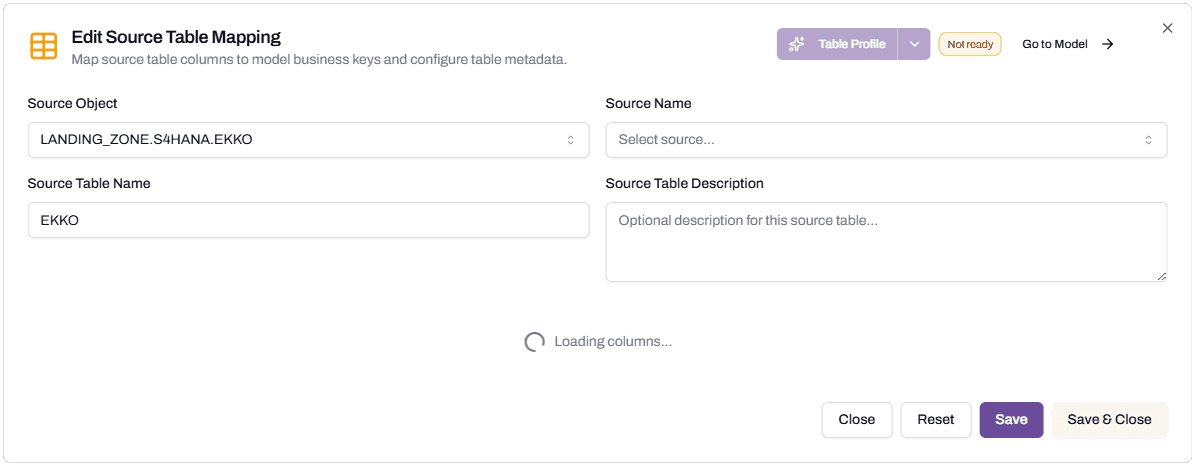
Both fields are in the Edit Source Table Mapping dialog. Click the source table card on the canvas to open it. Look in the section above the field list. You’ll see two side-by-side panels: Delete Condition on the left and Table filter on the right.

The (i) icon next to Table filter opens an info popup with example expressions and usage notes. The popup refers to the field as the WHERE Clause. Both labels describe the same SQL filter, applied to rows that are not already removed by the Delete Condition.
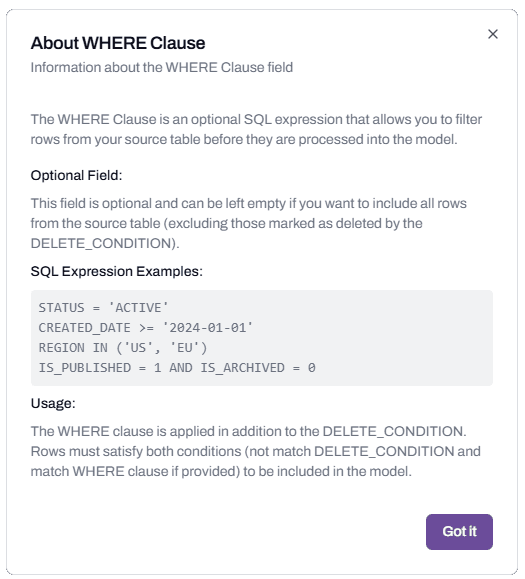
Table filter
Table filter is a SQL WHERE clause. The platform appends it to the load query. Rows that match the filter are loaded; rows that don’t are skipped.
The filter is manual. The platform doesn’t auto-suggest. You decide what to include based on what your model represents.
When to use it
The most common use is splitting an overloaded source table. Source systems often store multiple business object types in one table, distinguished by a type code.
SAP’s EKKO table holds:
- Purchase Orders (
BSART = 'NB'or'ZNB') - Stock Transfer Orders (
BSART = 'UB') - Contracts (
BSART = 'MK'or'WK') - Scheduling Agreements (
BSART = 'LP')
A model called Purchase Order Header should load only Purchase Orders. The Table filter on the source for that model:
BSART IN ('NB', 'ZNB')A separate Stock Transfer Order model can use the same EKKO source with a different filter:
BSART = 'UB'The two models share the source table but load different rows.
Other patterns
Date range. Limit a model to recent data: DOCUMENT_DATE >= DATEADD('YEAR', -2, CURRENT_DATE()).
Status filter. Exclude cancelled or draft records: STATUS NOT IN ('CANCELLED', 'DRAFT').
Tenant filter. Multi-tenant source systems often store data for several entities in one table. Filter to the tenant your model is for: COMPANY_CODE = '1000'.
Combined conditions. Multiple criteria with AND: BSART IN ('NB', 'ZNB') AND COMPANY_CODE = '1000' AND DOCUMENT_DATE >= '2020-01-01'.
What goes wrong
Common mistakes:
- Field names. The Table filter must use the source column names, not the model field names. SAP source columns and model fields can have similar names; the filter runs against the source. Reference EBELN, not PURCHASE_ORDER_HEADER.
- Quoting. String literals need single quotes:
BSART = 'NB', notBSART = NB. - Case sensitivity. Snowflake column names are usually upper-case. The filter is case-sensitive in some configurations.
If a filter looks right but loads zero rows, test it as a WHERE clause directly against the source table in a Snowflake worksheet.
Delete Condition
Delete Condition is a Boolean expression that marks a row as deleted in the source. The platform applies the condition during load: rows where the condition is true are recorded as deleted records in the model rather than being treated as new or updated.
This matters because some source systems use soft deletes. A row exists in the table even after the business considers it deleted; a flag column marks the record as no longer active.
The SAP soft-delete pattern
SAP marks deletions by setting LOEKZ = 'X'. The row stays in the table forever (or until archived), but the LOEKZ flag distinguishes active records from deleted ones.
For an SAP source, set:
LOEKZ = 'X'The platform now knows that rows matching this condition are deleted, not active.
Other patterns
Tombstone field. A column called DELETED_AT set to a timestamp when the record is soft-deleted: DELETED_AT IS NOT NULL.
Status code. A status field that includes “deleted” or “removed”: STATUS IN ('DELETED', 'REMOVED').
Compound conditions. A delete flag combined with another field: IS_DELETED = TRUE AND DELETED_AT < CURRENT_DATE().
What goes wrong
The most common issue is mistaking a Delete Condition for a Table filter. They’re different:
- Table filter controls which rows load at all. Rows excluded by the filter never appear in the model.
- Delete Condition controls how rows are interpreted once loaded. Rows matching the condition are loaded, but tagged as deleted records.
If you want to ignore deleted rows entirely (not have them appear at all), use a Table filter: LOEKZ <> 'X'.
If you want to track deletions in the model (so reports can show what was deleted and when), use a Delete Condition: LOEKZ = 'X'. The model’s load logic will treat matching rows correctly.
Hard deletes
Some source systems remove the row entirely when a record is deleted. There’s no flag to test, no row to load.
For hard-delete sources, leave Delete Condition empty. The platform’s incremental load logic detects rows that have disappeared from the source between loads and updates the model accordingly.
Validating filters
Both fields validate when you save the source table mapping. Validation checks that the SQL parses, not that it returns the rows you expect.
For a confidence check, run the same expression as a WHERE clause directly against the source table in a Snowflake worksheet:
SELECT COUNT(*) FROM <source_table> WHERE <your_filter>;The count tells you how many rows the filter would load.
For Delete Condition:
SELECT COUNT(*) FROM <source_table> WHERE <your_delete_condition>;This counts the rows that would be flagged as deleted.
Troubleshooting
Save fails with a SQL parse error
Likely cause: a typo, an unmatched quote, or an unsupported function.
Resolution: paste the expression into a Snowflake worksheet as a SELECT WHERE and see what error Snowflake reports. Fix the syntax and retry.
Before contacting support: capture the expression and the error message.
The model loads but with the wrong row count
Likely cause: the Table filter is matching unexpected rows, often because of case sensitivity, leading or trailing spaces, or a misunderstanding of what the source column contains.
Resolution: query the source table to confirm what values exist in the column you’re filtering on. SELECT DISTINCT BSART FROM EKKO is faster than guessing.
Before contacting support: capture the filter, an example of an unexpected row that was loaded (or excluded), and the source column’s actual values.
Deletes from the source aren’t showing up
Likely cause: the source uses soft deletes but Delete Condition isn’t set, or it’s set incorrectly.
Resolution: confirm the source’s deletion pattern (flag column, tombstone date, status code). Set Delete Condition to match. Re-deploy the model so the new logic takes effect.
Before contacting support: capture the source column that marks deletes, an example of a deleted row, and the Delete Condition value.
FAQs
Can I use both Table filter and Delete Condition on the same source?
Yes, and often you should. Table filter scopes which rows the model is interested in (just Purchase Orders, not other document types). Delete Condition then handles deletions within that scope.
For SAP Purchase Orders:
- Table filter:
BSART IN ('NB', 'ZNB') - Delete Condition:
LOEKZ = 'X'
Can I write filter logic that depends on values in another table?
Not directly. Both fields are scoped to the source table. Cross-table logic goes into a Snowflake view that handles the join, with the picker pointed at the view.
What if my filter is too long for the field?
Both fields accept multi-line expressions. There’s no documented length limit, but very long expressions are a sign that the filter logic should live in a view instead. Move the logic to a Snowflake view, point the source at the view, and keep the Table filter empty.
Can I change a filter after the data has loaded?
Yes. Edit the field, save, and re-deploy the model. The next load will apply the new filter. Existing data already loaded under the old filter stays until the model is reloaded fully.
Related articles
- Prerequisite: Map source fields to model fields
- Sibling: Add SQL expressions to transform fields
- Next step: Add or reference a second data product
- Troubleshooting: Set up warehouses for the studio
Search keywords
table filter, delete condition, WHERE clause, soft delete, hard delete, LOEKZ, BSART, document type filter, row filter, deletion flag