Provide context for entity generation
After you’ve picked a domain and process, the platform asks you to describe what you actually need. Three fields shape the output: Describe Requirements, List Required Components, and Source System. The quality of the output depends almost entirely on what you put here.
Applies to: Domain expert
The three fields
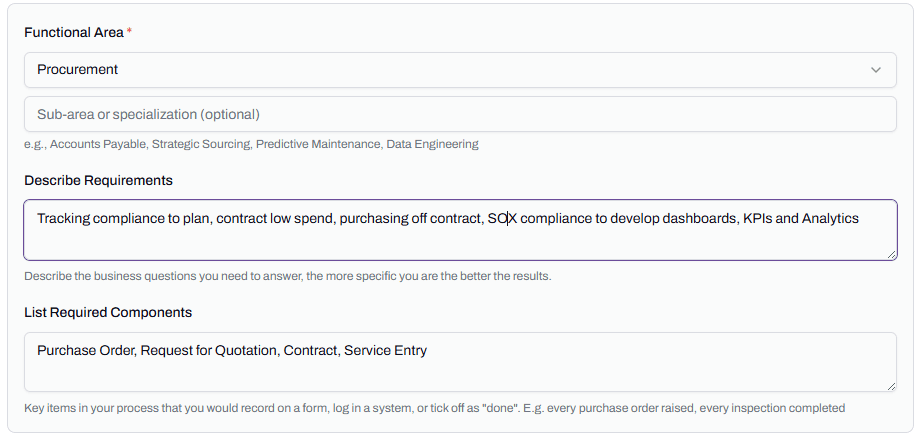
Describe Requirements is a free-text box. You write what you need to know, in the language your team uses.
List Required Components is a comma-separated list of artefacts the process must include. Things you would record on a form, log in a system, or tick off as done.
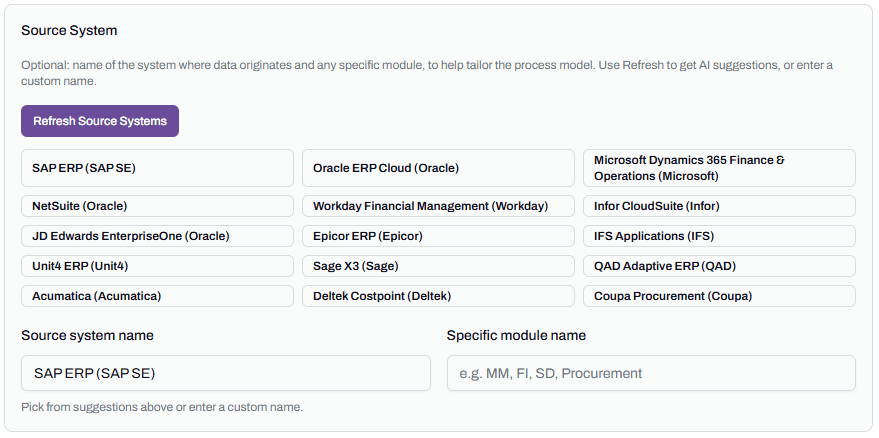
Source System is the system the data originates in. Optional, but useful. The platform can suggest source systems based on what you’ve already entered, or you can type one in.
The platform sends all three to Cortex along with the domain, process, and functional area, then uses the result to ground its entity generation.
What strong context looks like
Strong context is specific. It names business questions, not abstract goals. It lists artefacts the reader of the article would recognise.
Weak example for a Procure-to-Pay run:
Improve procurement reporting and provide better insights for the team.
That gives Cortex nothing to ground on. The output will be a generic Procure-to-Pay model with no opinion on what matters.
Strong example for the same run:
Tracking compliance to plan, contract leakage, off-contract spend, and SOX compliance for board reporting. Need to identify suppliers without active contracts and POs that bypass the approval threshold.
That’s four specific business questions and two named risks. Cortex has something to anchor against. The entity list and process map come back tighter.
The same pattern applies to Required Components. “Stuff for procurement” tells the platform nothing. “Purchase Order, Request for Quotation, Contract, Service Entry” gives it four artefacts it must include.
Source system matters more than it looks
Source system is marked optional, but skipping it means the platform names entities in generic terms. With a source system, the names align to the system’s conventions.
If you tell the platform you’re on SAP, what you would call a “service confirmation” comes back as a Service Entry, because that’s what SAP calls it. If you tell it you’re on Pronto Xi, what SAP calls a Notification comes back as a Work Request. If you don’t tell it anything, you get whichever name Cortex’s training data favours, which is usually SAP-flavoured.
Naming alignment now saves rework later. When the source data is connected in the Designer, business names and source columns line up rather than needing manual mapping.
Click Refresh Source Systems to get suggestions
The Source System section has a Refresh Source Systems button. Clicking it asks Cortex to suggest source systems based on the industry, domain, process, and context you’ve already entered. The suggestions vary with what you’ve put above.
The button isn’t required. You can type a system name directly into the Source system name field if you know what you’re working with. Use the suggestions when you’re not sure what’s typical for your industry, or when you want to confirm you’re using the system’s correct name.
Common mistakes
Vague requirements text. “We want better reporting” is too abstract. Three or four specific business questions is enough.
Too many required components. Listing twenty artefacts dilutes the signal. Five or six core ones is enough.
Skipping source system. Costs you alignment with no upside.
Using internal jargon without expanding it. “Track NCRs against the WO lifecycle” makes sense to a maintenance team but Cortex doesn’t know what NCR or WO mean. Expand acronyms once, then use them.