Read the deployment events timeline
The deployment events timeline is the event-by-event detail of a single deployment: validations run, objects created, errors raised, and completion. You read it when a deployment behaved unexpectedly and you need to see what happened step by step.
How it differs from deployment history
Deployment history is the summary: one row per run on the Deployment Logs screen, with its date, type, status, and object count. The events timeline is the detail within a single run. History tells you whether a deployment succeeded or failed; the timeline tells you which event it reached.
The Data Product Studio reports these events as a deployment runs. When you deploy a data product, the platform works through staging, data processing, keys, relationships, data, models, and the initial load, logging each step in the Deployment Logs panel: an INFO line as a step starts, a SUCCESS line as it completes, and an ERROR line if it fails.
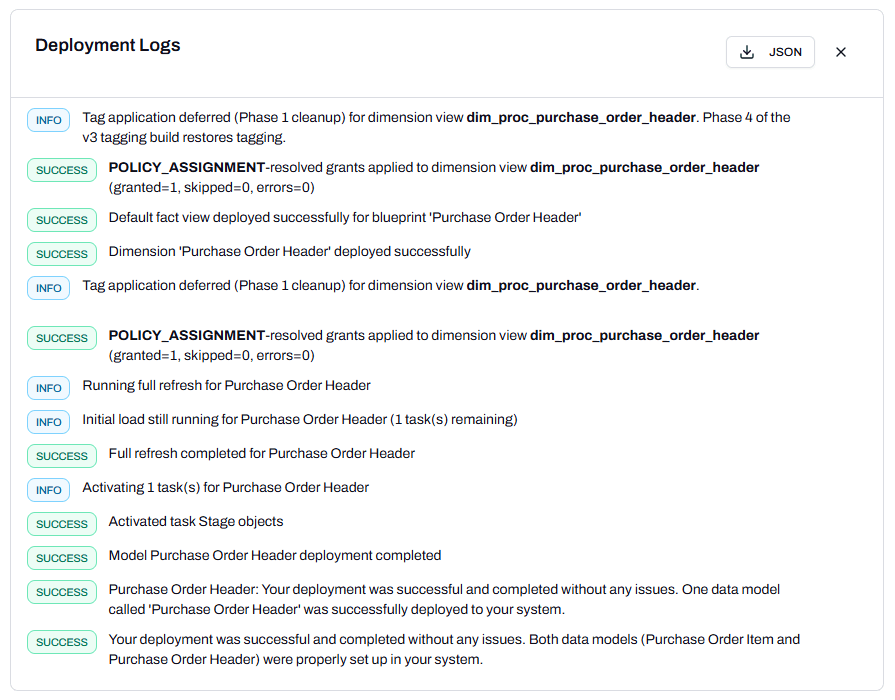
Use the JSON button to export the events as JSON for a support request or record-keeping.
When to use it
- A deployment failed and you need the failing event and its error.
- A deployment completed but an object is missing or wrong, and you want to see what ran.
Note: Reading the events timeline is a Snowflake admin task.
See also
- Prerequisite: View deployment history
- Sibling: Deploy a data product to Snowflake
- Reference: Deployment events timeline in the Glossary